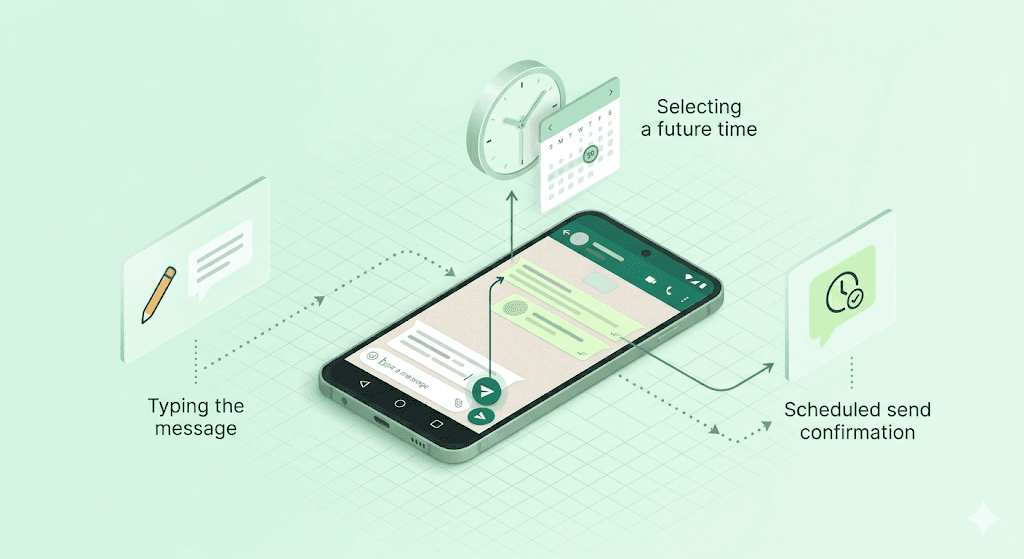
WhatsApp is one of the most-used messaging apps on Android, but many users still struggle with one simple problem: remembering to send important messages on time. Whether it’s a client follow-up, appointment reminder, birthday wish, or personal update, forgetting messages can easily disrupt communication.
That’s why more people are looking for ways to schedule WhatsApp messages on Android instead of relying on manual reminders or sending messages at the last minute.
In this guide, we’ll show you exactly how to schedule WhatsApp messages on Android step by step, how message scheduling works, and the easiest way to automate reminders and follow-ups directly from WhatsApp.
Can You Schedule WhatsApp Messages on Android?
Yes, Android users can plan and automate WhatsApp messages with the help of scheduling tools designed for reminders, follow-ups, and timed communication. Instead of sending messages manually every time, these tools allow conversations to be prepared in advance and delivered automatically later.
People commonly use WhatsApp scheduling on Android for:
- Appointment reminders
- Client communication
- Daily updates
- Event notifications
- Birthday messages
- Group coordination
For users who manage frequent conversations, scheduling helps reduce missed replies and keeps communication more organised throughout the day.
How to Schedule WhatsApp Messages on Android
Scheduling WhatsApp messages on Android is straightforward once you use a tool designed for message automation and reminders. Since WhatsApp does not currently provide full built-in scheduling for regular chats on Android, many users rely on solutions like Send Later to plan messages ahead of time and deliver them automatically.
Here’s how to schedule WhatsApp messages on Android step by step:
Step 1: Install Send Later for WhatsApp
Install Send Later on your Android device or browser to enable WhatsApp message scheduling, reminders, and automated follow-ups.
Step 2: Open WhatsApp on Android
Launch WhatsApp and open the chat where you want the scheduled message to be sent.
Step 3: Select a Contact or Group
Choose the person or WhatsApp group you want to message.
Step 4: Write Your Message
Type the message you want to send later. This can be a reminder, follow-up, update, announcement, or personal message.
Step 5: Choose the Date and Time
Select the exact delivery date and time for the message.
Step 6: Schedule the Message
Confirm the schedule, and Send Later will automatically deliver the message at the selected time.
Step 7: Manage Scheduled Messages
You can view, edit, reschedule, or delete scheduled messages anytime before they are sent.
Why People Schedule WhatsApp Messages on Android
Android users schedule WhatsApp messages to stay organised, avoid missed follow-ups, and communicate more consistently throughout the day. Instead of relying on memory or sending messages manually every time, scheduling helps automate important conversations and reminders.
Some of the most common reasons people schedule WhatsApp messages on Android include:
- Sending appointment and meeting reminders on time
- Following up with clients or leads without forgetting
- Scheduling birthday wishes and personal messages in advance
- Managing work updates and team communication more efficiently
- Sending messages during specific hours or time zones
- Planning daily reminders and recurring communication
For businesses, freelancers, agencies, and even personal users, scheduling messages on Android helps reduce manual effort while keeping conversations active and organised.
Common WhatsApp Scheduling Problems on Android
Scheduling WhatsApp messages on Android is usually simple, but certain issues can sometimes prevent messages from sending properly. Most of these problems are related to permissions, connectivity, or background activity restrictions on Android devices.
Here are some common WhatsApp scheduling problems Android users may face:
- Scheduled Messages Not Sending
Messages may remain pending if WhatsApp is disconnected or the scheduling app loses access in the background.
- Battery Optimization Restrictions
Many Android devices automatically restrict background activity to save battery, which can interrupt message scheduling.
- Internet Connection Problems
A weak or unstable internet connection may delay or prevent scheduled messages from being delivered.
- Notification or Permission Issues
Some scheduling tools require notification access or additional permissions to function correctly on Android.
- WhatsApp Logged Out or Inactive
If WhatsApp becomes inactive or disconnected, scheduled messages may fail to send at the selected time.
- Incorrect Date or Time Settings
Wrong timezone or device clock settings can cause messages to send earlier or later than expected.
- App or Browser Crashes
Occasionally, Android updates or app conflicts may interrupt scheduling features temporarily.
Most WhatsApp scheduling issues on Android can be resolved by keeping WhatsApp active, maintaining stable internet access, and allowing the scheduling app to run properly in the background.
Is Scheduling WhatsApp Messages on Android Safe?
Yes, scheduling WhatsApp messages on Android is generally safe when you use trusted tools that work responsibly with WhatsApp and avoid spam-like behaviour.
Most Android users schedule messages for reminders, follow-ups, personal communication, and productivity rather than bulk messaging or aggressive automation. Reliable scheduling tools are designed to support normal WhatsApp usage without modifying the app itself.
To stay safe while scheduling WhatsApp messages on Android:
- Use trusted scheduling apps or extensions
- Avoid bulk spam messaging tools
- Don’t send repetitive messages to unknown contacts
- Review app permissions before installing
- Choose tools that prioritise privacy and secure communication
Privacy is also an important factor. Before using any WhatsApp scheduling app on Android, it’s a good idea to check whether the tool stores messages, requests unnecessary permissions, or shares user data with third parties.
When used responsibly, WhatsApp message scheduling on Android can be a safe and effective way to automate reminders, follow-ups, and everyday communication.
Why Many Android Users Use Send Later for WhatsApp
One of the biggest reasons Android users choose Send Later is convenience. Instead of constantly checking WhatsApp to remember pending replies or important conversations, users can prepare messages in advance and let them send automatically at the right time.
Send Later also helps reduce the need for manual follow-ups by allowing conversations to be planned ahead, which is especially useful during busy workdays or when handling multiple chats at once.
Compared to complex automation platforms, the experience feels much lighter and easier to manage, making it a practical option for everyday WhatsApp communication on Android.
Final Thoughts
Scheduling WhatsApp messages on Android can make everyday communication much easier, especially when managing reminders, follow-ups, and important conversations throughout the day. Instead of relying on memory or sending messages manually at the last minute, scheduling helps users stay more organised and consistent.
While WhatsApp itself still offers limited scheduling capabilities for regular chats, tools like Send Later provide a simpler way to plan messages ahead of time and automate communication directly from Android workflows.
Whether it’s for personal use, work updates, or ongoing conversations, message scheduling helps reduce missed replies and keeps communication running more smoothly.
Frequently Asked Questions
Can I schedule WhatsApp messages on Android?
Yes, Android users can schedule WhatsApp messages using scheduling apps and automation tools that support timed message delivery and reminders.
Does WhatsApp support message scheduling on Android?
WhatsApp currently offers limited automation features, but full message scheduling for regular chats usually requires a third-party scheduling solution.
Can scheduled WhatsApp messages send automatically on Android?
Yes, scheduled messages can be delivered automatically at the selected time as long as the required permissions, internet connection, and app activity remain active.
Can I schedule messages for WhatsApp groups on Android?
Yes, most WhatsApp scheduling tools allow messages to be scheduled for both individual chats and group conversations.
Is scheduling WhatsApp messages on Android safe?
Scheduling WhatsApp messages on Android is generally safe when using trusted tools that avoid spam behaviour and follow responsible messaging practices.
Do I need WhatsApp Business to schedule messages on Android?
No, many scheduling tools work with both regular WhatsApp accounts and WhatsApp Business accounts on Android.
Can I edit or cancel scheduled WhatsApp messages?
Yes, most scheduling apps allow users to edit, reschedule, or delete pending messages before they are delivered.
Why are my scheduled WhatsApp messages not sending on Android?
This can happen due to battery optimization restrictions, disabled permissions, internet connection problems, or WhatsApp becoming inactive in the background.